Lens 2026.11.261430-latest - Release#
The new Stable release of Lens Desktop is here.
To ensure a smooth transition and minimize disruption we'll start by rolling out the update to a small portion of our users, then incrementally increasing this number until all users have access to the update. If you have not received the update and wish to try it out, you can download this version manually at https://lenshq.io/download
Key Features#
Autoscaling#
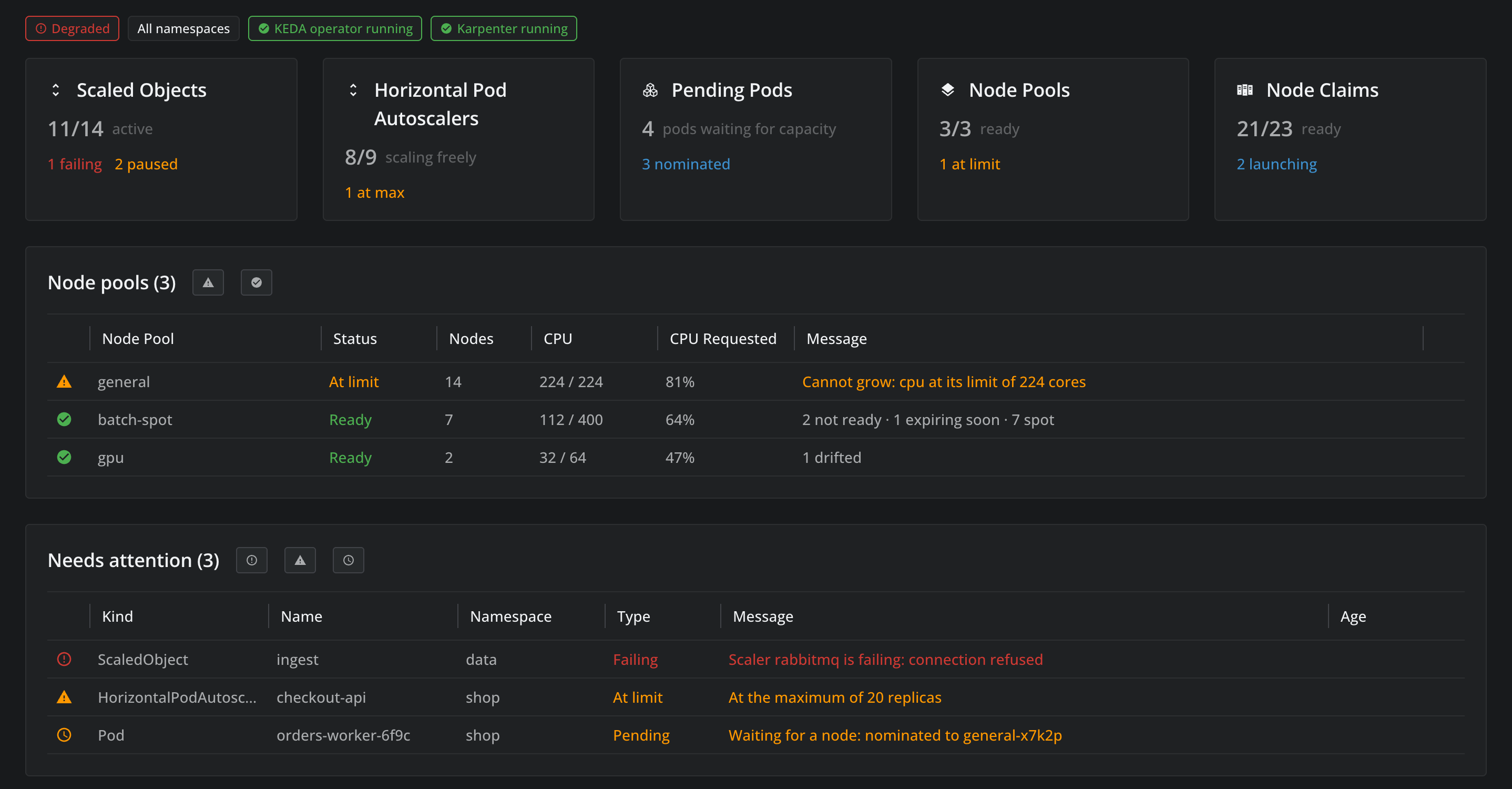
A new Autoscaling section in the cluster sidebar brings together KEDA, Karpenter and Horizontal Pod Autoscalers, so "why is this not scaling?" is answered in one place.
The dashboard shows overall health, the KEDA operator and Karpenter, cards for each kind, a Node pools table, Needs attention and Recent activity. There are lists and details for Scaled Objects, Scaled Jobs, Trigger Authentications, Node Pools, Node Claims, Node Classes and Pending Pods. A workload's details show its scaling chain, from the triggers through the scaler and its HPA to the pods and the nodes they land on. Scaled Object and HPA details show the replica history from Prometheus.
Pause or resume a KEDA scaler, hold it at a fixed replica count, and protect a node from Karpenter's disruption, all from the menus. A scaler managed by Flux or Argo CD warns that the change may be undone.
Autoscaling is a premium feature of Lens Plus, Pro and Enterprise.
External Secrets Operator#
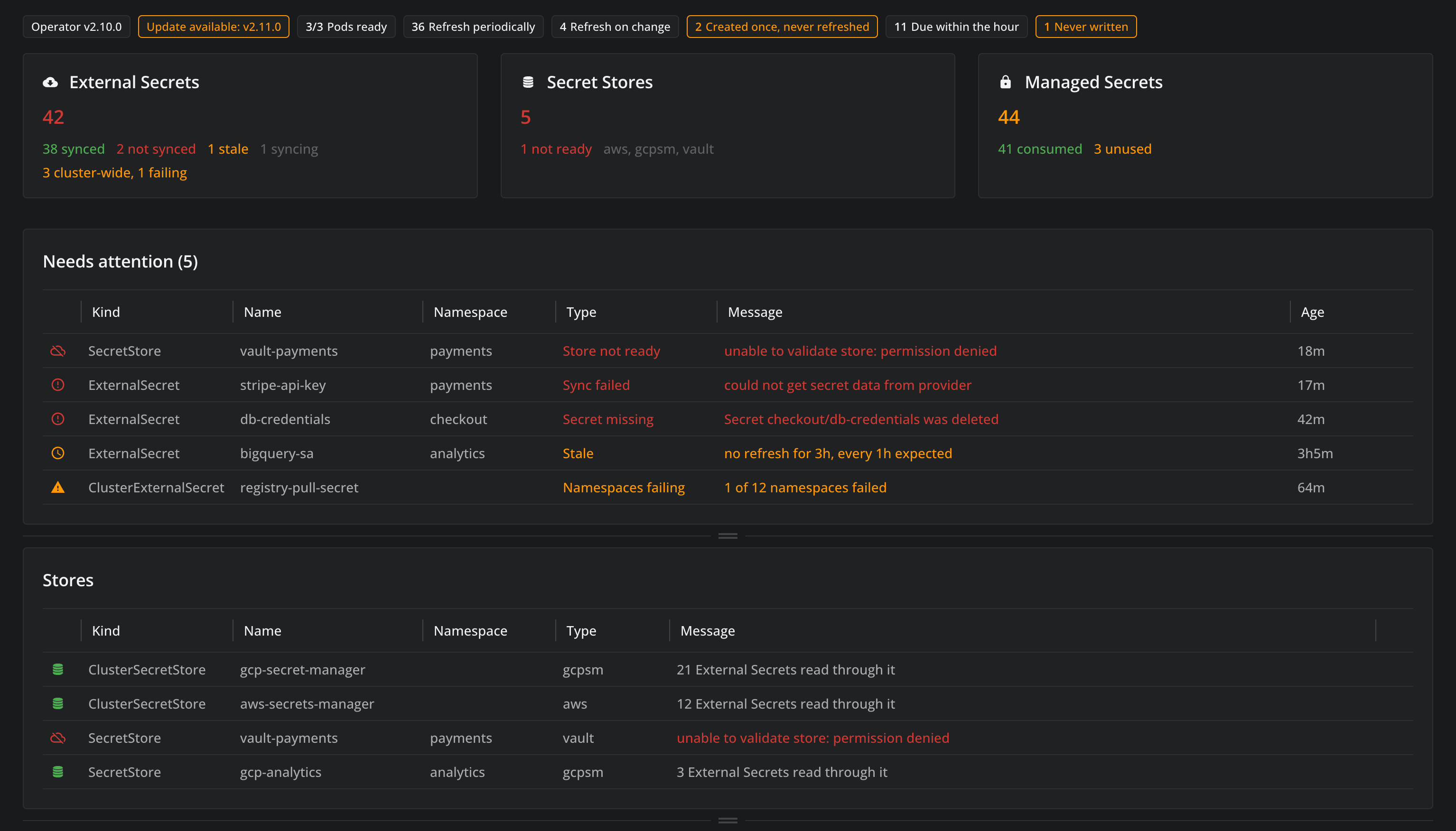
A new External Secrets section under Config shows on clusters where the operator is installed. It lists External Secrets, Secret Stores, Cluster External Secrets, Push Secrets and Generators.
The dashboard shows the operator's health and how the secrets refresh, with Needs attention naming each failing or stale resource and why. Details follow a secret from its store to the External Secret, the Secret it writes and the Pods that use it. Refresh an External Secret right away with Refresh now, create new ones from templates, and ask Ask AI about any of them. No Secret is ever handed to the AI.
External Secrets is a premium feature of Lens Plus, Pro and Enterprise. Every cluster with the operator also gets a "Synced from" column and a "Synced by" row in Config > Secrets, for free.
New Cluster Overview#
The Cluster Overview is now laid out in cards, with usage over time beside CPU, memory and pods. An Overcommitted chip replaces the old limits warning, and the Warnings chip takes you straight to the warnings. The usage chart scales to fit the usage.
The Argo CD, Flux and Cost Monitoring dashboards share the same look.
Reconcile Flux from Lens#
Reconcile, suspend and resume your Flux resources from the Flux dashboard or from a resource's own menu. Reconciling can refresh the sources first. Helm releases also get Force reconcile and Reset retries and reconcile. A Kustomization's details now show its source's latest revision and whether it is applied yet.
More for extensions#
- An extension can open a terminal already connected to a cluster, with the kubectl Lens keeps for it
- An extension can add its own entry to the + menu of a cluster's dock, and close its own tabs
- An extension can show what kubectl prints as it runs, such as a pod's logs or watched resources, and open Lens's log viewer for a pod
- Notifications an extension shows go away with it when it is disabled, uninstalled or updated
- An AI tool added by an extension opens in an external terminal with your configured shell
Enhancements#
- Saving a resource from the editor no longer adds a label of Lens's own to it. Only your edits are saved. Labels added by earlier versions stay until you remove them
- Notifications now show above an open dialog and stay clickable
- The summary cards of the dashboards open from the keyboard too
- The Cluster Overview no longer shows "No issues" or "0 nodes" while it is still loading, and says so when the warnings could not be checked
- The resource editor has an API Version dropdown. Choose another version the cluster serves, such as
v1orv2of a HorizontalPodAutoscaler, and the resource loads again at that version - The Extension Marketplace credits each extension to the author its package names, instead of the npm user who published it
- Send Feedback asks what your feedback is about, and for a problem what you were trying to do, what happened and what you expected
- Saving the values of a Helm release whose chart has no configured repository now explains why they can't be saved, and points to Upgrade
- The "By Lens" filter and badge of the Extension Marketplace now read "Highlight"
- Updated dependencies close more than 130 known security advisories, including every one rated high
Bug Fixes#
- Signing in with Lens ID now works when your proxy is set with
https_proxyorall_proxyin the shell environment. Before, the browser showed success while Lens kept asking you to sign in - Disconnecting and connecting again quickly, or restarting Lens with clusters open, no longer leaves a cluster with missing resource kinds or failing requests
- With the Prometheus Operator, pod CPU and memory no longer show empty on newer kubelets, or doubled
- On Windows, earlier answers of an Ask AI conversation are no longer overwritten
- A terminal shown again comes back at its latest output, or at the line you were reading
- Tools built on OpenSSL 3, such as Python's Kubernetes client, now connect to Lens Spaces clusters from a Lens terminal
- A tab layout saved with a group of no width no longer leaves the main view blank. Lens repairs it at startup
- The first resource you open from the navigator after starting Lens shows at once, instead of opening behind Release Notes
- The selected dock tab stays in view when the tab bar overflows
- In pod details, the environment of a container named
appshows in place instead of over the rows below - A details panel stays open when you drag its edge or select its text past the edge
- With tabs side by side, clicking in one group no longer closes the details panel open in another
- The select-all checkbox in table heads is centred, and its whole cell is clickable
- View KubeConfig for a ServiceAccount works on Kubernetes 1.24 and newer, where it failed with "Failed to find Secret for ServiceAccount". The KubeConfig also works with kubectl as it is, without naming a context
- A newly opened or cleared terminal could stay black for good while its shell kept running. It now keeps showing its output
- The details of Pods, Deployments and other resources now show their Security Center findings
- An AKS cluster that needs another Azure sign-in now shows the lock to sign in with, instead of an error saying the sign-in expired
- With two lists of the same kind side by side, sorting one no longer sorts the other
- Arrow keys in a resource list's search box move to the rows again, instead of opening your recent searches
- A details panel stays open when you minimize or resize the dock, and reaches down over the open dock instead of being cut off
- Closing a pod logs tab frees the memory of its loaded lines
- Exporting support logs no longer leaves an empty folder behind in the temp folder