Using External Secrets#
Lens premium subscription feature. See details on Lens Pricing.
The External Secrets group under Config opens a dashboard of the External Secrets Operator and gives you a list and details for each of its resource kinds.
View the dashboard#
- Connect to a cluster that runs the External Secrets Operator.
- In the cluster navigator, select Config > External Secrets > Dashboard.
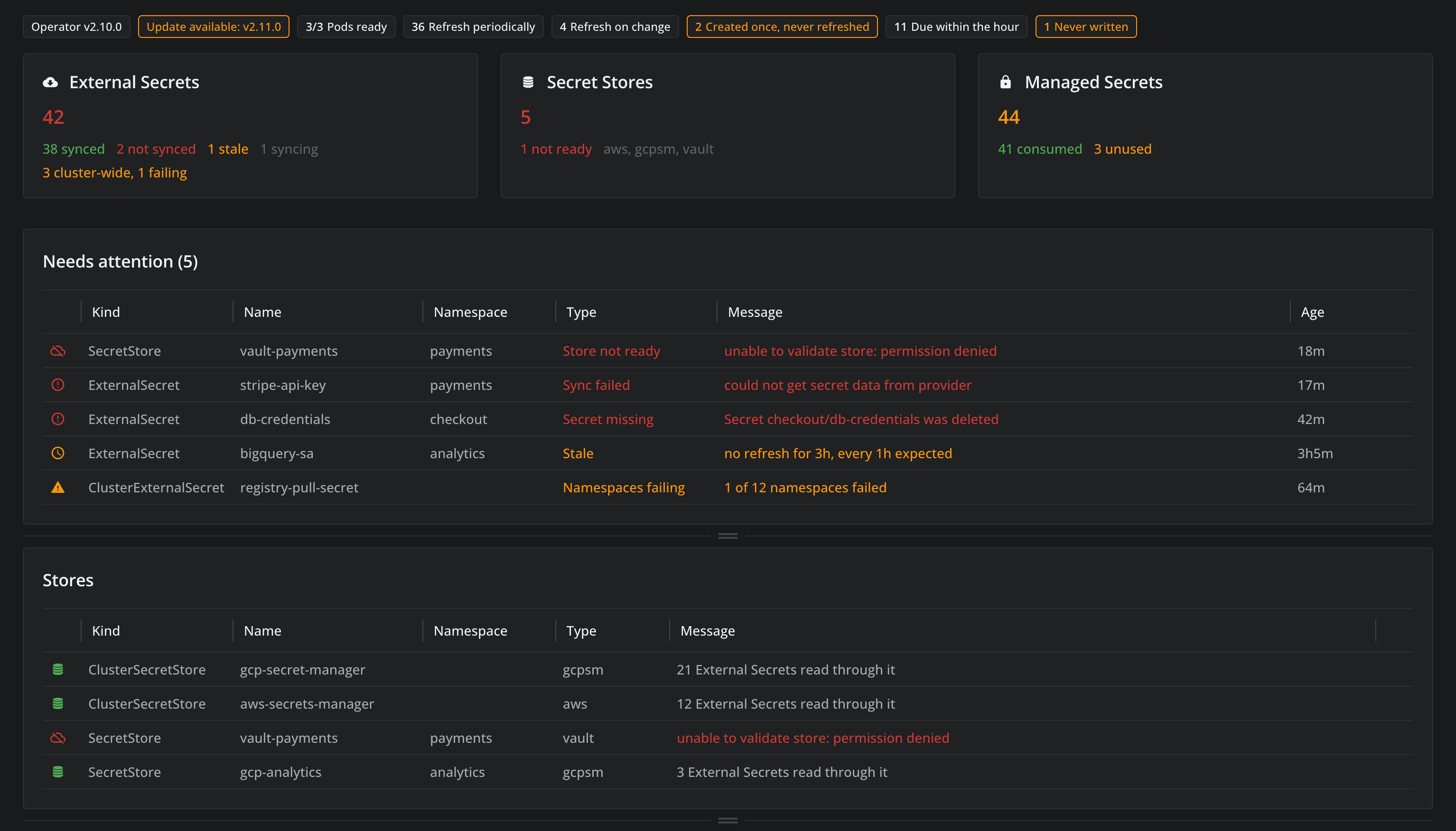
When the cluster has no External Secrets or stores yet, the dashboard shows No External Secrets yet. Select Create an External Secret to start one, or Getting started guide to open the operator's guide.
The dashboard updates every minute and has these areas.
Status chips#
| Chip | Meaning |
|---|---|
| Operator | The operator version, when all its Pods run the same one |
| Update available | A newer operator release is published |
| Pods ready | Ready operator Pods out of the total |
| Operator not found | No operator Pod is visible on the cluster |
| Operator not visible | Lens K8S IDE cannot list the Pods of the cluster |
| Refresh periodically | External Secrets that refresh on an interval |
| Refresh on change | External Secrets that refresh when their spec changes |
| Created once, never refreshed | External Secrets that keep the value they were created with when the secret rotates |
| Due within the hour | Periodic External Secrets whose next refresh falls within the coming hour |
| Never written | External Secrets the operator has not written a Secret for yet |
Tiles#
- External Secrets: the total, with how many are synced, not synced, stale, or syncing, and how many are cluster-wide.
- Secret Stores: the total, how many are not ready, and the providers in use.
- Managed Secrets: the Secrets the operator has written, split into consumed and unused. Lens K8S IDE counts them from the External Secrets, so a Secret deleted after it was written still counts.
Select a tile to open its list.
Needs attention#
The table lists the resources that need action, worst first. Select a row to open the resource's details.
| Type | Meaning |
|---|---|
| Store not ready | The store's Ready condition is False |
| Sync failed | The External Secret could not sync |
| Secret missing | The target Secret no longer exists |
| Provider secret deleted | The secret was deleted at the provider, and the deletion policy removed the target Secret |
| Stale | A periodic External Secret has not refreshed for more than twice its interval, and at least 5 minutes |
| Namespaces failing | A Cluster External Secret failed in some of its namespaces |
Stores and recent activity#
The Stores table lists each SecretStore and ClusterSecretStore with its provider and how many External Secrets read through it, busiest first. A store that is not ready shows its error.
Recent activity lists the events of External Secrets resources. Kubernetes keeps events for one hour by default.
View resources#
Each kind has its own list under External Secrets, with a details panel per resource:
| List | Columns |
|---|---|
| External Secrets | Name, Namespace, Status, Target Secret, Store, Provider, Refresh, Last Refresh, Age |
| Secret Stores | Name, Kind, Namespace, Provider, Capabilities, Status, Used by, Message, Age |
| Cluster External Secrets | Name, Status, Namespaces, External Secret, Store, Age |
| Push Secrets | Name, Kind, Namespace, Status, Source Secret, Stores, Keys pushed, Last Refresh, Age |
| Generators | Name, Namespace, Kind, Age |
The Secret Stores list holds SecretStores and ClusterSecretStores. The namespace filter narrows the SecretStores, and ClusterSecretStores always show.
Trace a secret from its store to its Pods#
Follow a secret through the details panels:
- Open a store. Used by lists the External Secrets that read from it.
- Open an External Secret. The Store row links back to the store with its status and provider, and Target Secret links to the Secret it writes.
- Keys shows each Secret key with the remote key it comes from.
- Consumed by lists the Pods in the same namespace that use the target Secret.
To trace the other way, start from a Secret. The Secrets list under Config has a Synced from column. A Secret's details show Synced by, with its External Secret, store, provider, status, and refresh times. Both are available without a premium subscription.
Refresh an External Secret#
To have the operator sync an External Secret now instead of at its next interval:
- Right-click the External Secret in its list, or open its menu.
- Select Refresh now.
Lens K8S IDE sets the force-sync annotation on the External Secret. Refresh now is disabled for External Secrets with the CreatedOnce refresh policy, which never refresh. Edit the policy to sync them again.
Create from templates#
The create-resource editor offers templates for ExternalSecret, SecretStore, ClusterSecretStore, ClusterExternalSecret, and PushSecret, under the external-secrets group. Lens K8S IDE writes them at the API version your cluster serves. Generators have no template: each of their kinds has its own spec. For details, see Create resources.
Ask AI about External Secrets#
When Ask AI is set up, select Summarize in the context menu of an External Secret, Cluster External Secret, store, or Push Secret. Each list also has the Ask AI button in its toolbar to summarize the selected items.
Related topics#
-
Requirements, premium access, and how Lens detects the operator.
-
Investigate Kubernetes resources with the AI tool of your choice.