Argo Rollouts#
Lens premium subscription feature. See details on Lens Pricing.
Lens K8S IDE shows Argo Rollouts resources under the Argo CD entry of the cluster navigator. Follow each rollout's current step, traffic weight, and revisions, and promote, fully promote, pause or resume, abort, retry, or restart a rollout from its menu. The Argo CD dashboard also lists the rollouts that wait for promotion.
Argo Rollouts support is part of the Argo CD feature and shares its access: a Plus, Pro, or Enterprise subscription plan, or a Personal subscription with an active trial.
The video below finds a canary rollout awaiting promotion on the dashboard, promotes it from the Rollouts list, opens its steps and revisions, and shows the analysis run that starts next:
Argo CD and Argo Rollouts#
Argo CD and Argo Rollouts are separate projects, and each one solves a different problem:
- Argo CD decides what runs in the cluster. It compares the manifests in a Git repository with the resources in the cluster and reports each Application as Synced or OutOfSync. When a commit changes a manifest, Argo CD applies the change, on its own or when you select Sync. It applies every kind of manifest, a
Rolloutamong them. - Argo Rollouts decides how a new version replaces the old one. A
Rolloutresource takes the place of aDeployment, and the Argo Rollouts controller updates it with a canary or blue-green strategy: it sends part of the traffic to the new version, pauses, runs an analysis, and then promotes or aborts the update.
graph LR
    subgraph cd [Argo CD: what to deploy]
        commit[A commit changes<br>a manifest] --> git[Git repository]
        git -->|read by| argocd[Argo CD<br>compares Git with the cluster]
    end
    argocd -->|applies| deploy[Deployment<br>rolling update by Kubernetes]
    argocd -->|applies| rollout[Rollout]
    other[kubectl, Helm, Flux,<br>or a CI pipeline] -->|applies| rollout
    subgraph ro [Argo Rollouts: how to deploy]
        rollout --> ctrl[Argo Rollouts controller]
        ctrl --> stable[Stable revision]
        ctrl -->|canary weight| canary[Canary revision]
    end
Neither project needs the other:
| The cluster runs | What happens on an update |
|---|---|
| Argo CD only | Argo CD syncs Deployment resources from Git, and Kubernetes replaces their pods with a rolling update. |
| Argo Rollouts only | Any tool applies the Rollout, for example kubectl, Helm, Flux, or a CI pipeline, and the controller runs the canary or blue-green update. |
| Both | Argo CD syncs the Rollout from Git, and the controller runs the update. |
Lens K8S IDE shows both projects under the Argo CD entry, whichever of the two the cluster runs.
View the Rollouts entry#
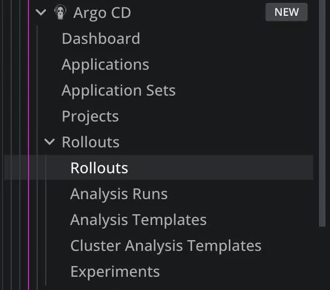
Lens K8S IDE detects Argo Rollouts from its custom resource definitions (CRDs) in the argoproj.io group. When the cluster has any of them, the Argo CD entry gets a Rollouts group. On a cluster that runs Argo Rollouts without Argo CD, the Argo CD entry holds the Dashboard and the Rollouts group.
Each item in the group appears only when its CRD exists in the cluster:
| Entry | CRD | Contents |
|---|---|---|
| Rollouts | rollouts |
Every Rollout in the cluster |
| Analysis Runs | analysisruns |
Every AnalysisRun in the cluster |
| Analysis Templates | analysistemplates |
Every AnalysisTemplate in the cluster |
| Cluster Analysis Templates | clusteranalysistemplates |
Every ClusterAnalysisTemplate in the cluster |
| Experiments | experiments |
Every Experiment in the cluster |
Reconnect to refresh the Navigator
The Navigator updates during the cluster connection process, when Lens K8S IDE reads the cluster's CRDs. Disconnect and reconnect the cluster after installing or removing Argo Rollouts to refresh it.
Deploying Argo Rollouts is outside the scope of this documentation. See the Argo Rollouts installation guide .
List views#
Each entry opens a list. Use the namespace selector and the search field to narrow it.
| View | Columns |
|---|---|
| Rollouts | Name, Namespace, Strategy, Status, Step, Weight, Pods, Age |
| Analysis Runs | Name, Namespace, Status, Owner, Revision, Age |
| Analysis Templates | Name, Namespace, Metrics, Age |
| Cluster Analysis Templates | Name, Metrics, Age |
| Experiments | Name, Namespace, Status, Templates, Duration, Age |
In the Rollouts view:
- Strategy is Canary or Blue-green.
- Status is Healthy, Progressing, Paused, or Degraded.
- Step shows the steps done over the total, for example
3/8. It stays empty for a rollout without steps. - Weight shows the canary weight the current step sets. The details panel shows it next to the actual weight, the share of traffic the canary receives now.
- Pods shows available pods over desired pods.
Analysis runs and experiments report one of these statuses: Pending, Running, Successful, Inconclusive, Failed, or Error. Templates within an experiment can also show Progressing.
Rollout details#
Select a rollout to open its details panel. The panel has up to three sections. Steps appears only for a canary rollout with steps.
Rollout lists the state of the rollout. A field appears only when it applies to the rollout's strategy and state:
| Field | Shows |
|---|---|
| Status | The phase, with the controller's message when there is one |
| Strategy | Canary or Blue-green |
| Step | The steps done over the total |
| Set weight | The canary weight the current step sets. Canary only |
| Actual weight | The share of traffic the canary receives now |
| Stable service, Canary service | The Services of a canary rollout |
| Active service, Preview service | The Services of a blue-green rollout |
| Auto-promotion | Enabled or Disabled. Blue-green only |
| Paused | By user, the pause reasons of the controller, or both |
| Aborted | When the update was aborted |
| Analysis run | A link to each analysis run of the rollout, with its status |
| Experiment | A link to the experiment of the rollout |
| Replicas | Desired, current, updated, ready, and available pods |
| Images | The container images |
| Workload | A link to the workload the rollout references |
| Restarted | When the rollout was last restarted |
Steps lists every step of a canary rollout with its State: Done, Current, or Pending. Each step reads as its action, for example Set weight 20%, Pause until promoted, Pause 30s, or Analysis followed by the template names.
Revisions lists the ReplicaSets of the rollout, newest first, with their Role: stable, canary, active, or preview. The section also shows the images and pods of each revision.
How a canary rollout advances#
The Argo Rollouts controller runs the steps of a canary rollout in order, and the Step and Weight values follow it:
- Step counts the steps done, so it equals the total once every step is done.
- Weight is the weight of the last Set weight step the rollout reached. It is
100%once every step is done, and0%after an abort. - Pause until promoted holds the rollout until you select Promote. Meanwhile the status is Paused, and the Argo CD dashboard lists the rollout as Awaiting promotion.
- A pause with a duration, such as Pause 30s, ends without any action from you.
- After the last step, the new revision receives all the traffic and becomes stable in Revisions.
To follow a canary update from start to end, see Run a canary rollout with Argo Rollouts.
Analysis and experiment details#
| Resource | Sections |
|---|---|
| Analysis run | Analysis (status, revision, start and completion time), Metrics (provider, status, measurements, and the last measurement of each metric), and Arguments |
| Analysis template, Cluster analysis template | Metrics (provider, interval, count, success condition, and failure limit of each metric), and Arguments |
| Experiment | Experiment (status, duration, availability), Templates (ready state, status, and message of each template), and Analyses |
Arguments and Analyses appear only when the resource has them.
Act on a rollout#
To act on a rollout:
- In the cluster navigator, select Argo CD > Rollouts > Rollouts.
- Right-click a rollout, or open its context menu.
- Select an action.
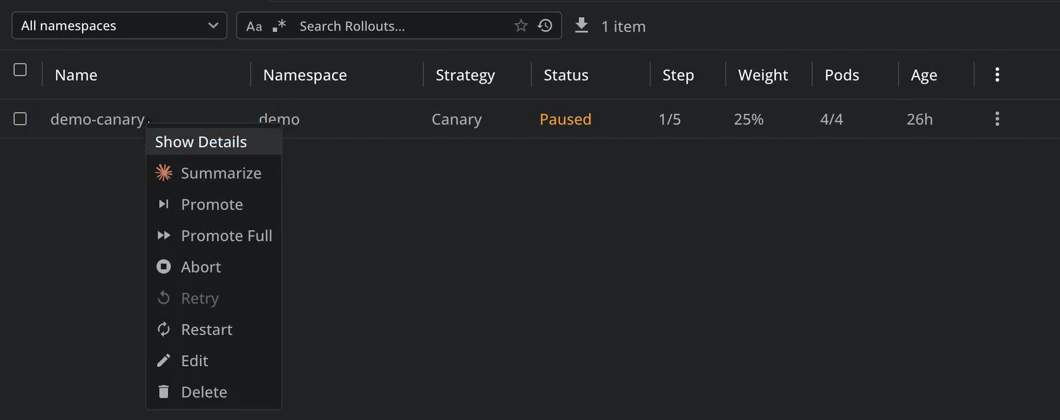
| Action | What it does | In the menu |
|---|---|---|
| Promote | Moves the rollout past its current pause, or to the next step | Enabled while the rollout is paused or has steps left, and is not aborted. Greyed out otherwise |
| Promote Full | Skips every remaining step and analysis. The new revision becomes stable at once | Enabled while an update is in progress or a user paused the rollout, and it is not aborted. Greyed out otherwise |
| Pause | Pauses the rollout | Shown only while the rollout runs unpaused |
| Resume | Resumes a rollout you paused | Shown only while a user's pause holds the rollout, in place of Pause |
| Abort | Scales the new revision down and sends all traffic back to the stable revision | Enabled while an update is in progress and is not aborted. Greyed out otherwise |
| Retry | Restarts the aborted update | Enabled while the rollout is aborted. Greyed out otherwise |
| Restart | Replaces the pods of the rollout, a few at a time | Always enabled |
When the controller pauses a rollout at a step and no user has paused it, the menu shows neither Pause nor Resume. Select Promote to move the rollout to its next step.
Promote Full, Abort, and Restart ask for confirmation first. A notification reports the result, for example Promoted rollout followed by the rollout name.
Lens K8S IDE applies each action as a merge patch to the Rollout resource, and the Argo Rollouts controller carries it out. Promote, Promote Full, Abort, and Retry also patch the status subresource, so your Kubernetes role needs the patch verb on both rollouts and rollouts/status. These actions apply to rollouts only.
Rollouts on the Argo CD dashboard#
The Argo CD dashboard includes rollouts when the cluster has at least one:
- The Rollouts card shows healthy rollouts over the total, with a chip for each paused, degraded, and progressing count.
- Needs attention lists every rollout that is Aborted, Degraded, Paused, or Awaiting promotion. Paused means a user paused it. Awaiting promotion means the controller paused it at a step, including timed pauses. A paused entry shows the step, for example Step 2/5, and the pause reasons.
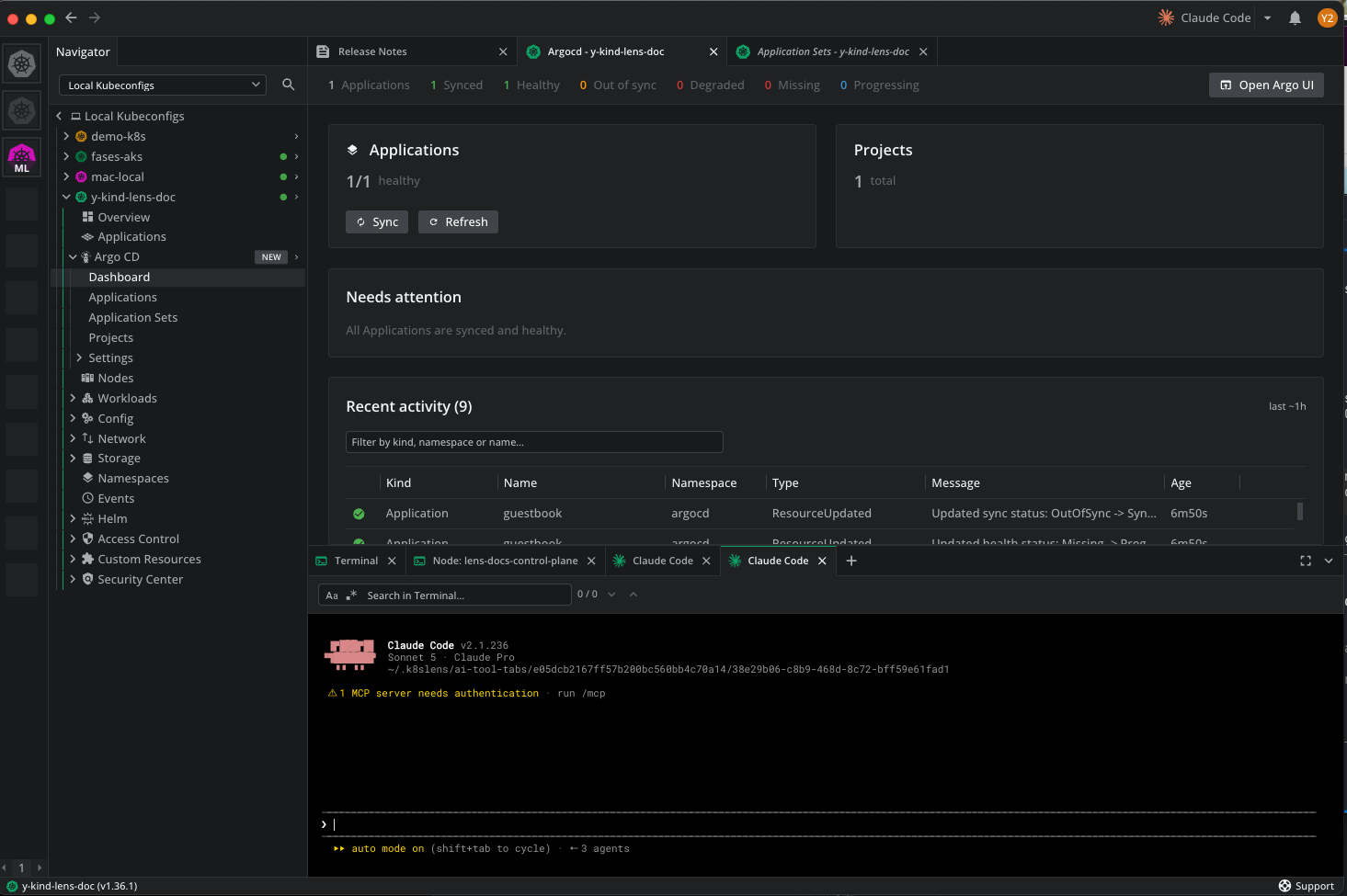
Select a rollout in Needs attention to open its details, then select Promote from its menu.
Related topics#
-
Update a workload step by step, promote it past a pause, or abort it.
-
Dashboard, resource views, sync and refresh actions, and Ask AI.
To discuss Argo Rollouts support for your organization, contact us.