Lens 2026.9.181013-latest - Release#
The new release of Lens Desktop is here.
To ensure a smooth transition and minimize disruption we’ll start by rolling out the update to a small portion of our users, then incrementally increasing this number until all users have access to the update. If you have not received the update and wish to try it out, you can download this version manually at our website .
Enhancements#
-
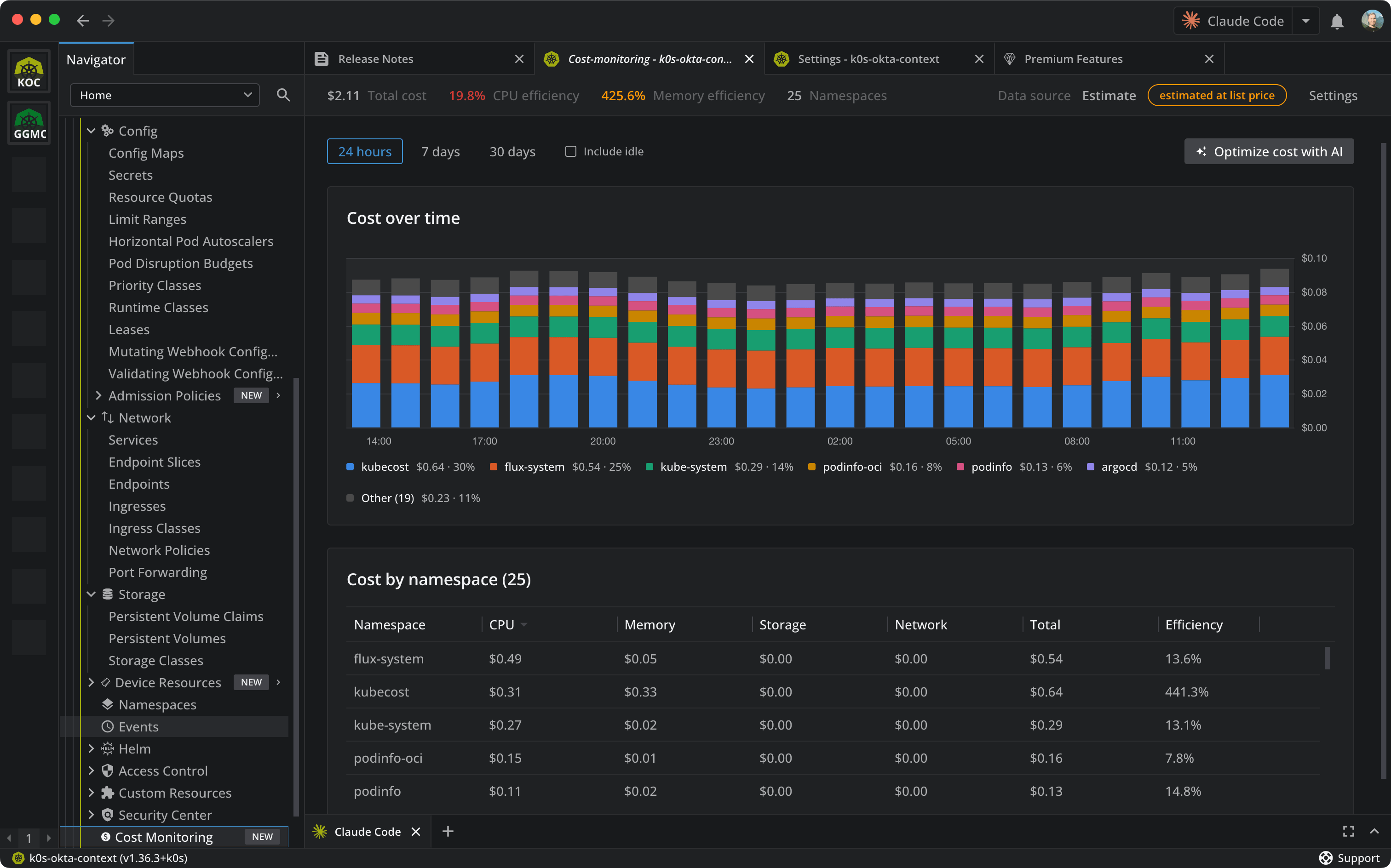
Cost Monitoring. See what your cluster costs and optimize spending right in Lens. The new Cost Monitoring dashboard shows where the money goes, by day, week or month, and how much of what you pay for goes unused. Nothing to install, and if you run OpenCost or Kubecost, Lens uses them too. A Cost section in the cluster settings lets you pick the data source and adjust the prices. Cost Monitoring is a premium feature.
-
VictoriaMetrics auto-detection. If your cluster is monitored with VictoriaMetrics, Lens now finds it on its own and shows your metrics. No setup needed.
-
Azure Government and Azure China. Lens now works with Azure organizations in the US Government and China clouds. Choose your cloud when you add the organization, and Lens signs in there, finds your AKS clusters, fetches their credentials and points the cluster terminal's Azure tooling at the right cloud. Organizations signed in with different Azure accounts now work side by side too, so adding a second one no longer stops the first from showing its clusters.
-
Priority Classes show their pods. The Priority Classes list now counts the pods using each class, and a class's details list those pods, so a class in use is told apart from one nothing refers to any more.
- AWS EKS sign-in. AWS SSO profiles that need signing in again show a clickable "Sign in required" label, and clicking the profile itself starts the sign-in; the lock icon is no longer the only way in.
- Menus by keyboard. Every menu in Lens can now be worked with the keyboard: the arrow keys move between items, ArrowRight opens a submenu and ArrowLeft closes it, and focus returns to where the menu was opened from.
- Menu accessibility. Elements that open a menu show a pointer cursor and announce themselves as buttons to screen readers again.
Bug Fixes#
- Cluster Connect after sleep. Clusters reached through Cluster Connect no longer stay unreachable after the computer wakes from sleep: tunnels are rebuilt on wake, every reconnect attempt has a deadline, and disconnecting and reconnecting the cluster recovers it.
- Reconnect storms on expired sessions. When a cluster's credentials expire, such as an AWS SSO session, Lens no longer retries its resource watches several times a second forever, which kept CPU busy and drained battery while idle; retries now back off, up to five minutes.
- Right-click menus in the navigator open at the cursor again instead of far below it.
- Ask AI without a configured tool. Asking AI about a resource with no AI tool configured no longer opens an empty terminal.
- Custom AI tool selection. The Custom AI tool can again be selected in preferences before its command has been written.
- AI tool icon state. The AI tool icon in the details panel toolbar and the resource context menu is shown in full colour when Ask AI is available, instead of looking disabled.
- Namespace selection by keyboard. In the namespace selector, Space toggles a namespace instead of replacing the selection and closing the menu, and the keyboard focus no longer jumps back to "All namespaces" after each toggle.
- Terminals inside AI agent sessions. Terminals opened from a Lens that was itself started inside an AI agent session, such as Claude Code, no longer pass the agent's session markers on, so an agent started in a Lens terminal keeps its transcript and can be resumed.