Inspect DRA devices#
Kubernetes Dynamic Resource Allocation (DRA) describes every device a driver finds on a node in a ResourceSlice. This page shows how to find those devices in Lens K8S IDE and how to read what a driver says about them. For the views themselves, see Device Resources.
Whatever the hardware, a device is described by the same three fields: a name, attributes, and capacity.
Find the devices on a node#
To see what a node advertises:
- From your cluster, navigate to Nodes.
- Click the node to open its details panel.
- Scroll to the Devices section.
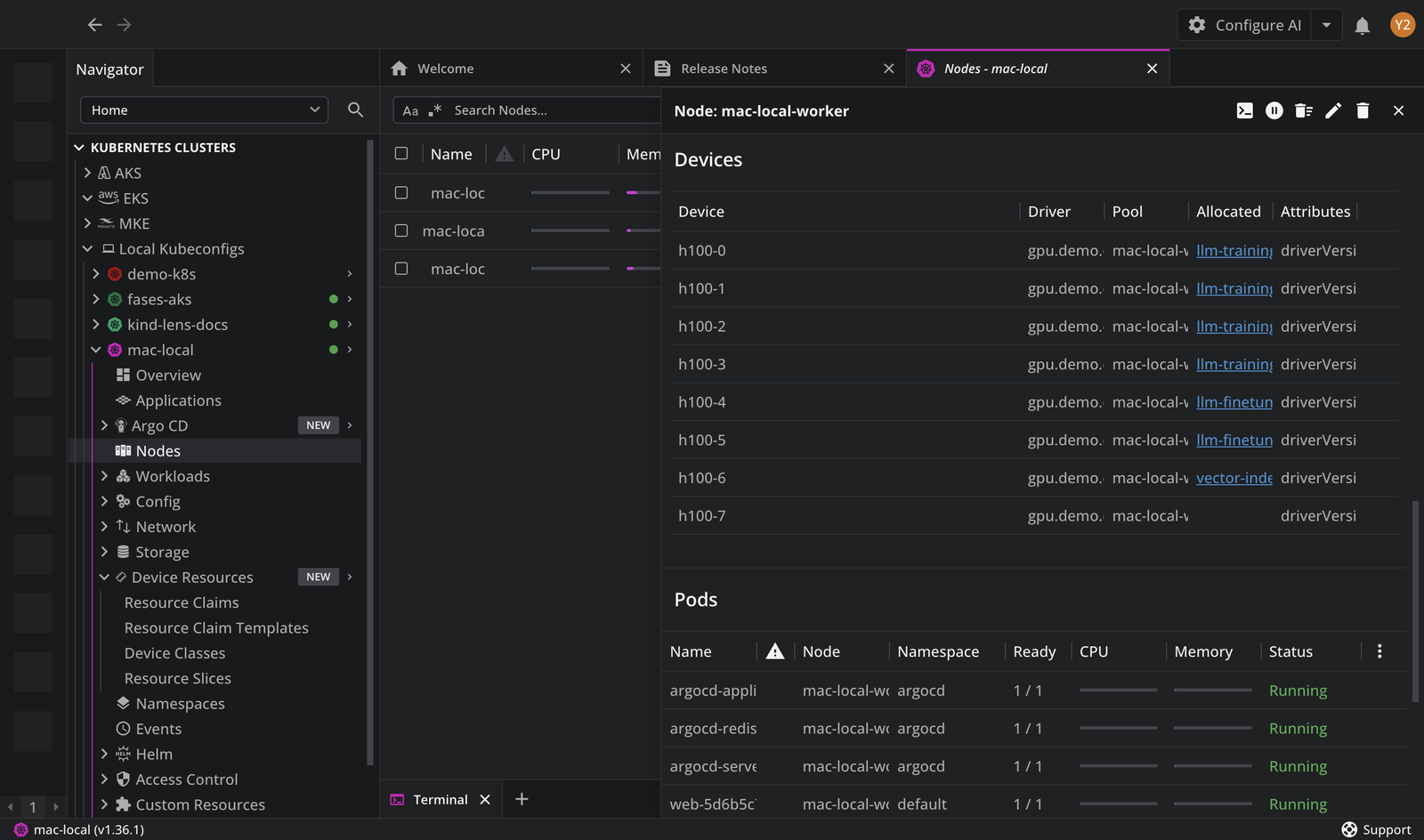
The section lists every device published for that node, with the driver that published it, its pool, the ResourceClaim holding it, and its attributes. A device with no claim in the Allocated By column is free. Click a row to open the ResourceSlice the device came from.
Read a ResourceSlice#
A slice belongs to one driver, lives in a pool, targets a node, and carries a list of devices:
apiVersion: resource.k8s.io/v1
kind: ResourceSlice
spec:
  driver: <DRIVER-NAME>
  pool:
    name: <POOL-NAME>
    generation: 1
    resourceSliceCount: 1
  nodeName: <NODE-NAME>     # or nodeSelector, or allNodes: true
  devices:
    - name: <DEVICE-NAME>
      attributes: {}         # int, bool, string, or version values
      capacity: {}           # quantities such as "40Gi"
      taints: []
Read a device description#
Attributes name the hardware. The gpu.nvidia.com driver names full GPUs gpu-0, gpu-1, and so on, and describes each one like this:
- name: gpu-0
  attributes:
    productName:           { string: "NVIDIA A100-PCIE-40GB" }
    architecture:          { string: "Ampere" }
    cudaComputeCapability: { version: "8.0.0" }
    driverVersion:         { version: "580.126.20" }
    uuid:                  { string: "GPU-2fa81118-5a5f-aa66-7660-471eed407181" }
    resource.kubernetes.io/pciBusID: { string: "0000:65:00.0" }
    resource.kubernetes.io/numaNode: { int: 0 }
  capacity:
    memory:          { value: "40Gi" }
    multiprocessors: { value: "108" }
Most attributes are namespaced to the driver that publishes them, so their names differ between a GPU driver and a network driver. Attributes prefixed resource.kubernetes.io/ are standardized, and every driver reports them the same way. The pcieRoot and numaNode attributes are what let one claim request a GPU and a network interface on the same PCIe root.
For the attributes and capacities a specific driver publishes, read that driver's documentation. Device classes select on these values, so to see which devices a class covers, open it in the Device Classes view and read its Selectors.