Lens tools#
Lens premium subscription feature. See details on Lens Pricing.
Besides the Kubernetes tools and Prometheus tools, the Lens MCP Server offers the same Lens tools as Ask AI. With them, your AI tool works in Lens K8S IDE itself: it opens resources and dock tabs, manages port forwards, reads costs, and drives Lens.
Your MCP client lists the tools by name. Each description starts with Lens:, followed by what the tool does, its input, and its output. Your AI tool calls them for you. Ask it in natural language, for example "Open the logs of the crashing pod in Lens."
Extensions can add tools too. Their names start with the extension package, for example acme-backups-run-backup-now for the run-backup-now tool of the @acme/backups extension.
Tools that need a feature in the cluster
Your client lists vulnerability-summary while your subscription includes Security Center. A call works only on a cluster that runs the Trivy Operator. On another cluster, the call fails and the error says why.
The video below shows Claude Code, connected through the Lens MCP Server, reading memory use in a namespace, opening a Deployment in Lens, and opening the Cost Monitoring dashboard:
What changes and what waits for you#
Your AI tool prepares changes to your cluster, and you decide whether to apply them. For example, ask "Scale the web deployment to 3 replicas". Your AI tool calls open-resource-editor, and Lens opens the Deployment in the YAML editor with replicas: 3 already in it. Lens changes nothing in the cluster until you select Save in the editor toolbar.
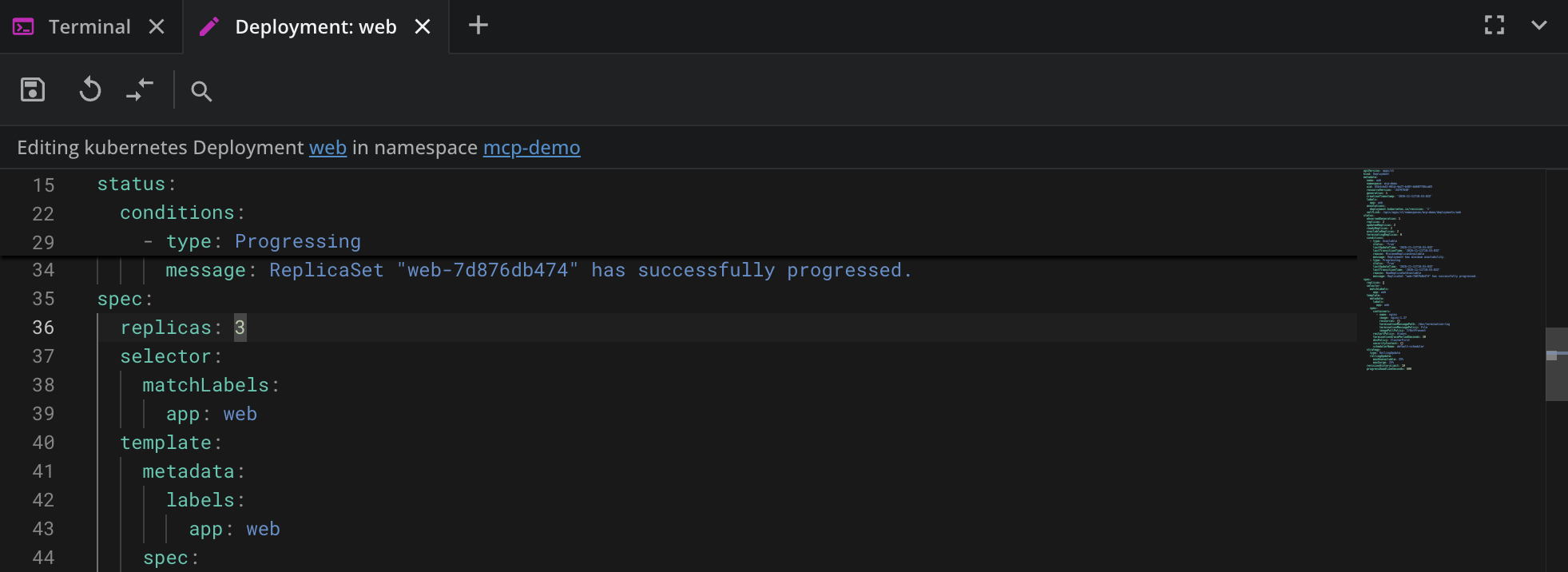
These tools open an editor, a dialog, or a terminal. Lens applies the change only when you save it, confirm it, or run it:
open-create-resourceandopen-resource-editor: you review the YAML, then create or save.open-helm-install,open-helm-upgrade,open-helm-rollback-dialog, andopen-port-forward-dialog: you confirm the dialog.type-in-lens-terminal: you press Enter.install-extension: you confirm the install.
These tools change Lens itself without asking:
| Tool | What it changes |
|---|---|
start-port-forward, stop-port-forward |
Port forwards |
set-cost-rate, select-cost-source, refresh-azure-prices |
The cost settings of a cluster |
pin-cluster-to-hotbar, unpin-cluster-from-hotbar |
The hotbar |
run-command |
Runs a command palette command. The built-in commands open views, except Shell: install 'lens' command in PATH |
relaunch-to-update |
Quits Lens, installs the update, and starts Lens again |
A tool or a palette command that an extension adds does what the extension defines. While the driving tools are on, your AI tool also clicks and types in Lens the way you do.
Lens and clusters#
| Tool | What it does |
|---|---|
active-cluster |
Tells which cluster the tab in front shows |
list-navigator-items |
Lists what the navigator shows under one of its items |
navigate-to-resource-list |
Opens a cluster's list of one kind of resource |
open-resource-details |
Opens one resource in its details panel, connecting the cluster first |
open-cluster-settings |
Opens a cluster's settings |
open-preferences |
Opens Preferences, on a given page |
open-command-palette |
Opens the command palette with a search |
list-commands |
Lists the commands the command palette offers |
run-command |
Runs a command palette command |
list-notifications |
Lists the notifications Lens shows |
dismiss-notification |
Dismisses a notification |
notify |
Shows a notification in Lens |
copy-to-clipboard |
Puts text on your clipboard |
open-in-browser |
Opens a web page in your default browser |
pin-cluster-to-hotbar |
Pins a cluster to the hotbar |
unpin-cluster-from-hotbar |
Takes a cluster off the current hotbar page |
add-cluster-to-space |
Opens the dialog that adds a cluster to a Lens Space |
For list-clusters and connect-cluster, see Kubernetes tools. The server offers one tool per name, so each appears once.
Windows and split screen#
| Tool | What it does |
|---|---|
open-tab-in-new-window |
Moves an open tab into a window of its own |
open-resource-list-in-new-window |
Opens a resource list in a window of its own |
open-navigator-item-in-new-window |
Opens a navigator item in a window of its own |
open-resource-list-beside |
Opens a resource list beside the current view |
describe-tab-layout |
Describes how the tabs are laid out |
arrange-tabs |
Lays out open tabs side by side |
Dock#
| Tool | What it does |
|---|---|
open-pod-logs |
Opens the live logs of a container in a dock tab |
open-terminal-in-lens |
Opens a terminal in a dock tab |
type-in-lens-terminal |
Types a one-line command in a dock terminal without running it |
open-create-resource |
Opens the create-resource editor with drafted YAML |
open-resource-editor |
Opens a resource in the YAML editor |
Helm#
| Tool | What it does |
|---|---|
open-helm-chart |
Shows a Helm chart |
open-helm-release |
Shows a Helm release |
open-helm-install |
Opens the install tab for a chart |
open-helm-upgrade |
Opens the upgrade tab for a release |
open-helm-rollback-dialog |
Opens the rollback dialog for a release |
Port forwards#
| Tool | What it does |
|---|---|
list-port-forwards |
Lists the port forwards Lens keeps for a cluster |
start-port-forward |
Starts a port forward to a pod or a service |
stop-port-forward |
Stops a port forward, and removes it when asked |
open-port-forward-in-browser |
Opens the local address of a running port forward |
open-port-forward-dialog |
Opens the port forwarding dialog |
Metrics#
| Tool | What it does |
|---|---|
prometheus-status |
Tells whether Lens has a Prometheus to query for a cluster |
query-prometheus |
Runs a PromQL range query against the Prometheus Lens uses |
get-resource-metrics |
Gives the metrics of one resource |
cluster-usage |
Tells how much of a cluster's capacity is in use |
Costs#
| Tool | What it does |
|---|---|
cost-allocation |
Tells what a cluster costs over a period |
cost-trend |
Tells how a cluster's cost moved over a period, by namespace |
cost-briefing |
Gives the cost briefing Lens uses for cost optimization |
cost-source |
Tells where Cost Monitoring gets its figures, and why |
cost-node-types |
Lists nodes by type, with the estimated price per node-hour |
set-cost-rate |
Sets a rate the cost estimate uses |
select-cost-source |
Chooses the cost source, or turns Cost Monitoring off for the cluster |
refresh-azure-prices |
Fetches current Azure retail prices for the cluster's VM sizes |
open-cost-dashboard |
Opens the Cost Monitoring dashboard |
open-cost-settings |
Opens the cost settings of a cluster |
For details, see Cost Monitoring.
Security#
| Tool | What it does |
|---|---|
vulnerability-summary |
Summarizes known vulnerabilities in the cluster's images, as the Security Center shows them |
Extensions and updates#
| Tool | What it does |
|---|---|
search-extensions |
Searches the public Lens extensions |
list-installed-extensions |
Lists the installed extensions |
open-extension-details |
Shows a public extension's page |
install-extension |
Installs a public extension, after you confirm |
lens-update-status |
Tells whether a downloaded update waits for a relaunch |
relaunch-to-update |
Quits Lens, installs the update, and starts Lens again |
Driving Lens#
With the driving tools, your AI tool sees Lens and uses it the way you do. Lens offers them over MCP only while Preferences > External Tools > AI Tools > Let AI tools see and drive Lens is on. It is off by default. The preference sets the default for Ask AI conversations, and it is the only control over MCP.
| Tool | What it does |
|---|---|
list-lens-windows |
Lists the Lens windows that can be driven |
screenshot |
Takes a screenshot of a Lens window |
read-text |
Reads the text a Lens window shows |
click |
Clicks an element |
type-text |
Types text into the focused element |
press-key |
Presses one key |
evaluate |
Evaluates a JavaScript expression in a Lens window |
wait-for |
Waits until a JavaScript expression is true |
set-driving-speed |
Sets how fast the tool drives |
conclude-driving |
Ends driving with a summary of what got done |
disable-ai-tool-driving |
Stops the tool from seeing and using Lens |
While an MCP client drives, the driving indicator at the bottom of the window reads {tool} is driving Lens over MCP, with the name your MCP client gives itself. Click anywhere in Lens to stop it. For the full behavior, see See and drive Lens with Ask AI or an MCP client.
The video below shows Claude Code, connected through the Lens MCP Server, opening Workloads and then Pods in the navigator, with the driving indicator naming it as it drives:
What the tool sees leaves your machine
Screenshots and screen text go to your AI tool and its AI provider, including anything Lens shows from every connected cluster.