Optimize cost with AI#
Lens premium subscription feature. See details on Lens Pricing.
The Cost Monitoring dashboard tells you where the money goes. Optimize cost with AI takes the next step: it hands the figures to your AI tool and asks it where to save.
Start it#
Select Optimize cost with AI, on the right of the window selector.
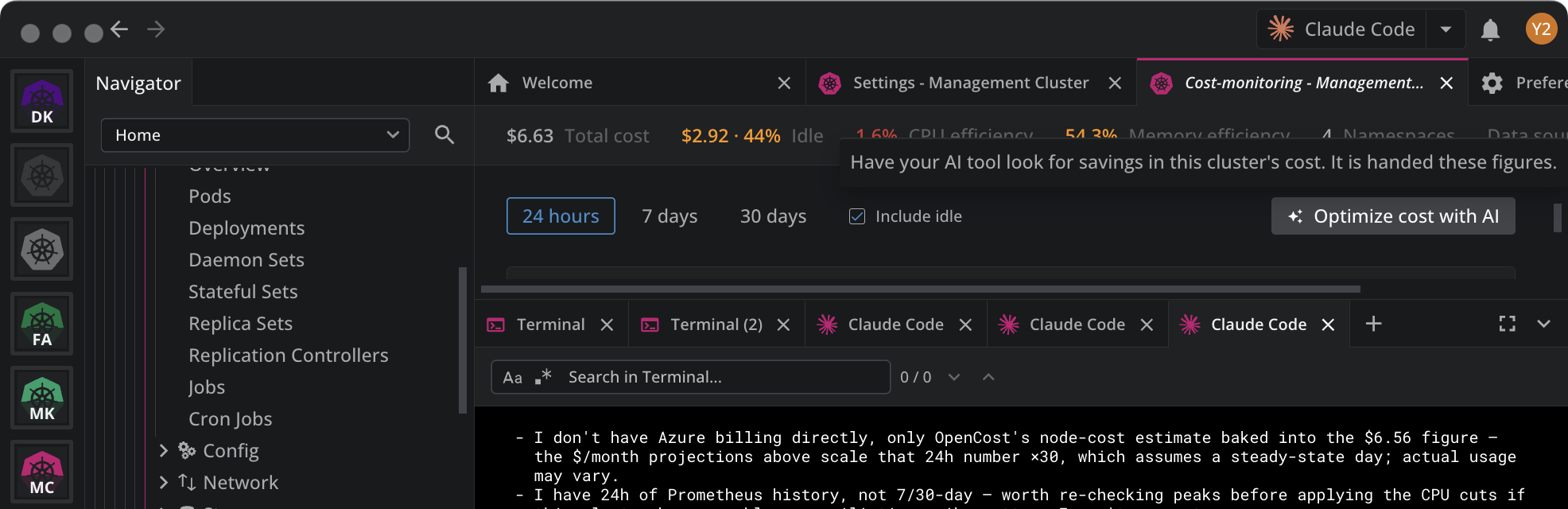
Lens opens Ask AI on the cluster, hands it a cost briefing, and seeds it with one instruction:
Start from the cost briefing in your instructions: find the biggest savings in this cluster's cost and propose concrete changes.
The tooltip says what leaves the app before you select it. With a measured source it reads "It is handed these figures". With the estimate it reads "It is handed these figures, and the node types and rates".
What Lens hands over#
The briefing is the part your AI tool cannot see from inside the cluster:
- The total for the window, the idle capacity in it, and cluster-wide CPU and memory efficiency.
- The 25 costliest namespaces, with their CPU, memory, storage, and network costs, and their efficiency.
- The node types and the rates they are priced at, when the source is the estimate.
- Where the figures came from, so the tool knows whether it is reading a measurement or an estimate.
Everything else, the tool reads from the cluster itself. It has your cluster context, so it looks at requests, limits, replicas, autoscaling, and node pools directly.
What comes back#
The briefing asks for proposals rather than another audit. The tool ranks opportunities by what they save, prices each one against the figures above, and says what could break.
A real reply, on a three-node AKS cluster costing $6.56 a day with 44% idle:
Ranked opportunities

1. Scale the nodepool from 3 → 2 nodes — biggest lever

Total requests (5,689m CPU / 7,431Mi mem) and actual usage both fit comfortably
inside 2 nodes' allocatable capacity (7,720m / ~24GB), even with zero other changes.

- Savings: idle capacity is 44% of $6.56/day across 3 equal nodes (~$2.19/node/day).
  Removing one node removes roughly that share → ~$60–70/month. Estimate, medium
  confidence — OpenCost's per-node split isn't something I verified directly, and this
  assumes the 3rd node isn't there for a reason I can't see from here.
- What could break: less headroom for node maintenance/upgrades and fewer nodes to
  spread system daemonsets across for HA. Going to 2 preserves basic redundancy;
  going to 1 would not — I wouldn't recommend that.
- This is an AKS/VMSS-level change (az aks nodepool scale, not kubectl) — I have not
  touched it.

2. Right-size CPU requests on 6 control-plane pods (evidence: 24h Prometheus peaks)

- global-prometheus-server-0: 700m → ~100m
- kcm-controller-manager: 500m → ~100m
- kcm-cluster-api-operator (×2 pods): 200m → ~50m each

Savings: ~2,050m of the cluster's 5,689m total CPU requests (36%) freed up. High
confidence these specific numbers are safe (grounded in 24h peaks, not a snapshot).
What could break: requests below peak with too little buffer could throttle a
controller during a burst — I sized these with ~2–3x headroom over the observed peak.

3. Fix loft's memory request (reliability, not a saving)

Its 24h peak (1245Mi) exceeded its request (1024Mi) — under memory pressure this
container could be evicted first. Raise the request to ~1.3–1.5Gi.

Missing data / caveats

- I don't have Azure billing directly, only OpenCost's node-cost estimate baked into
  the $6.56 figure — the $/month projections scale that 24h number ×30.
- I have 24h of Prometheus history, not 7/30-day — worth re-checking peaks before
  applying the CPU cuts.

Want me to apply the CPU-request right-sizing (item 2) and the loft memory fix
(item 3) now — both are low-risk kubectl-level changes? Item 1 (node scale-down)
needs your go-ahead separately since it's an Azure-side infra change.
Three things in that reply are the briefing doing its job:
- Every proposal carries a cost and a risk. A saving with no "what could break" is not actionable.
- It separates a saving from a reliability fix. Item 3 costs slightly more, and says so. Efficiency above 100% is an eviction risk, not money on the table.
- It states its confidence and what it is missing. Twenty-four hours of history is not a week, and the tool says so rather than presenting the estimate as a measurement.
It proposes before it changes anything#
The tool asks for your go-ahead and applies a change only when you give it. Nothing in the briefing tells it to act on its own.
Read what it proposes before you accept. The figures are averages over the window, so check usage peaks before cutting a request, which is exactly what the reply above does.
Requirements#
Optimize cost with AI needs an AI tool configured under Preferences > External Tools. See Configure Ask AI.
The button reports its own state:
| State | What you see |
|---|---|
| Ready | The button is active. Its tooltip says what is handed over. |
| No AI tool set up | The button is disabled, and its tooltip reads "Set up Ask AI under Preferences › External Tools to have it look for savings here." |
| Not in your subscription | The button is active, and its tooltip reads "Upgrade your plan to use AI tools". Selecting it opens the upgrade path. |
| Ask AI unavailable | The button does not appear. |